
See and control every router you deploy
LINBLENET Cloud is the device management platform that comes with our router range. No third-party software to integrate, and no second vendor to chase when something breaks — the firmware and the dashboard come from the same people who built your hardware.
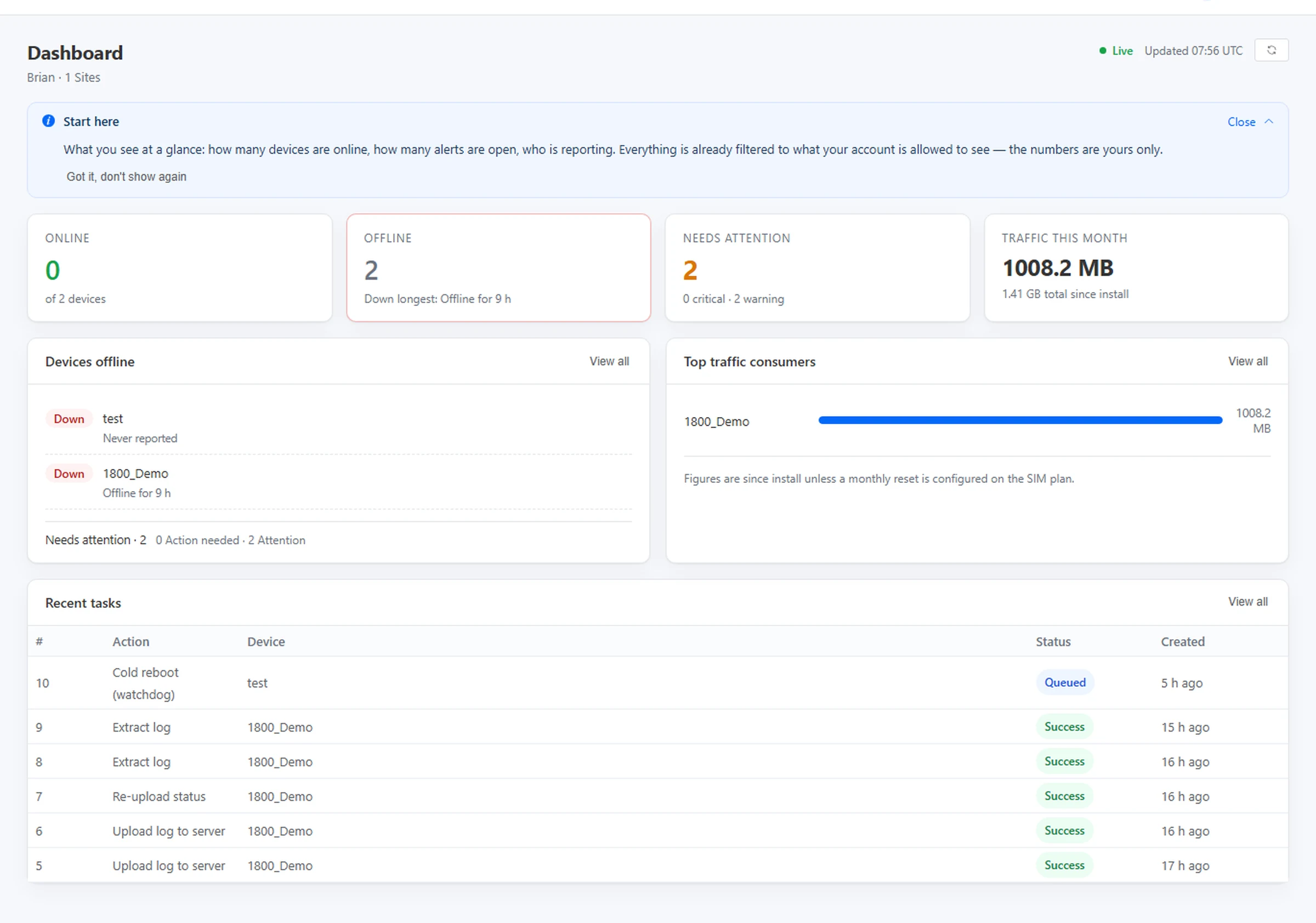
- Online / offline per unit, with the reason it is down
- Remote reboot, and firmware upgrades for a whole batch
- Commands queue and run when an offline unit reconnects
- Users and sites scoped by us — your operators see only their own
Accounts are opened by us rather than self-service: tell us which models you run and we set up the dashboard, the sites and the users. Existing customers can sign in with the credentials they already have.
Built as an overseas product, not a translation
LINBLENET Cloud is built as an overseas product, not a translation of a domestic system. The interface is locked to the site’s language on the server, so it will not flip back to Chinese when a customer’s browser is set to German or Dutch. On the overseas platform, only LINBLENET appears — there is no parent-brand co-branding.
Which routers it covers today
LINBLENET Cloud is being rolled out across our router range, model by model. Coverage depends on both the unit and the firmware build it ships with — so rather than publish a list that goes stale, we confirm it against the specific units you are buying.
Nominate the units, we check each one
Tell us which models you plan to run. We confirm which of them report to the platform, over which line, and what that means for remote actions.
Existing units can be attached
Already running our routers at customer sites? Send us the serial numbers and we connect them to your dashboard — without touching their configuration.
Coverage keeps expanding
The platform is being extended across more of our range. If your model is not covered when you ask, it is worth asking again later.
Anything we cannot confirm, we say so before you order rather than after we deliver. That is the difference between a capability sheet and a working fleet.
Three questions, every morning, on every site
A deployed router is not a problem until it stops reporting. By then a truck is already on its way. The platform is built around the three things that tell you whether that trip is necessary.
Is it still on site and still connected?
Each unit reports on a heartbeat. When one goes quiet you see it in the offline list with how long it has been down — not in a ticket queue tomorrow morning.
Difference that matters: “never reported” and “reported, then went offline” are shown as two distinct states. They have completely different causes.
Who used all the data?
Per-device traffic for the month, plus a ranking of top consumers. Figures reset on your SIM plan’s month, or run since install if you prefer — the dashboard states which.
Useful when a site on a fixed data plan starts throttling: you find the unit pulling the traffic before the carrier bills you for it.
Can I fix it without going there?
Reboot a single unit, reset a misbehaving one, or push a firmware upgrade to a batch. Every action is logged with who sent it and what the device answered.
If the unit is offline when you send it, the task stays queued — it runs on the next connection instead of failing silently.
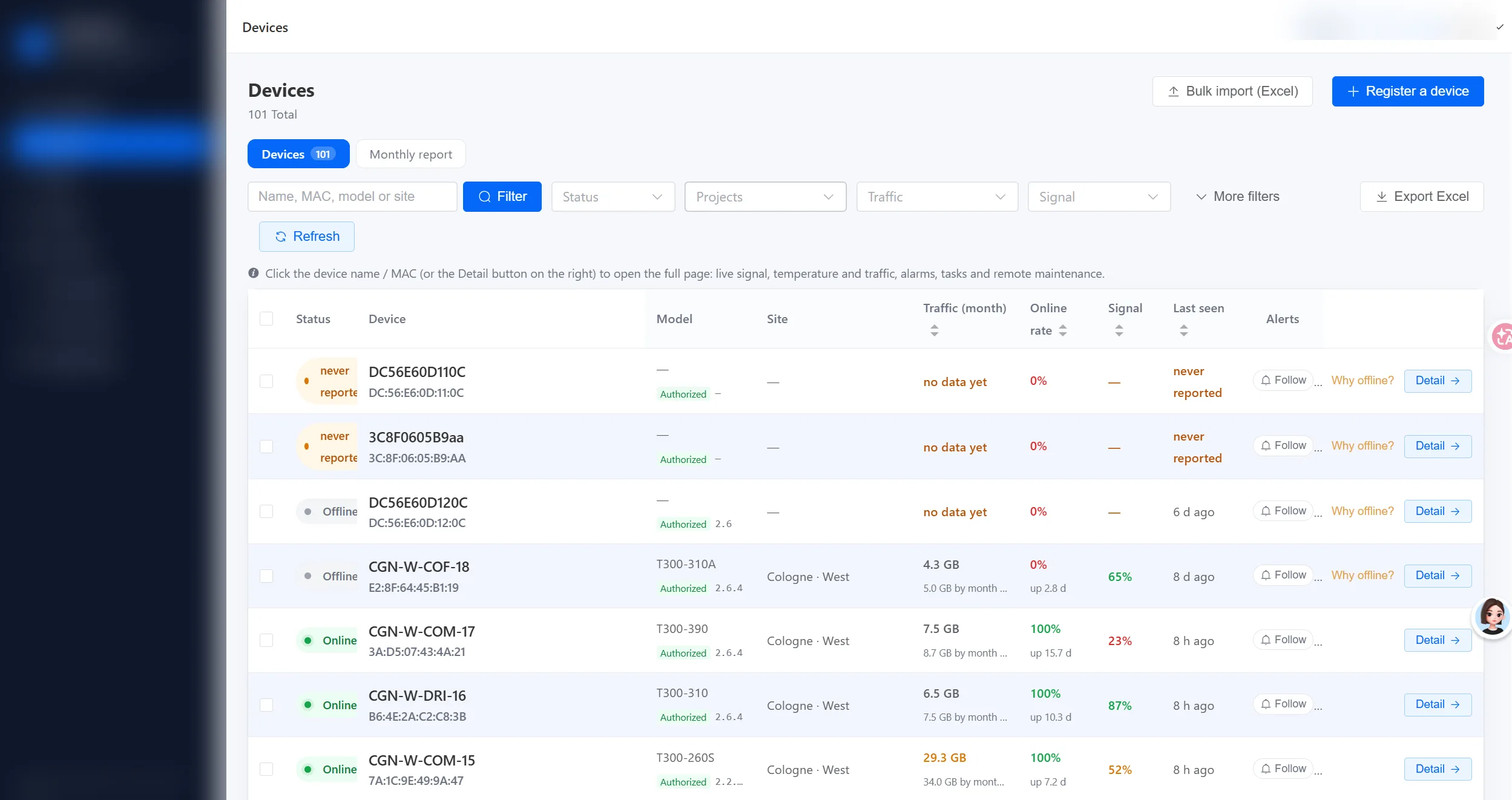
A device list that tells you why, not just that
Offline is the least useful piece of information on its own. The list separates an authorised unit that has never phoned home from one that was working yesterday and stopped.
What is on the row
Status, access, protocol and last seen — in one row
Each device carries its model, the protocol it reports over, and the date it last checked in. A unit has to be approved before it is allowed to connect at all, so a stray device cannot join your account by guessing a key.
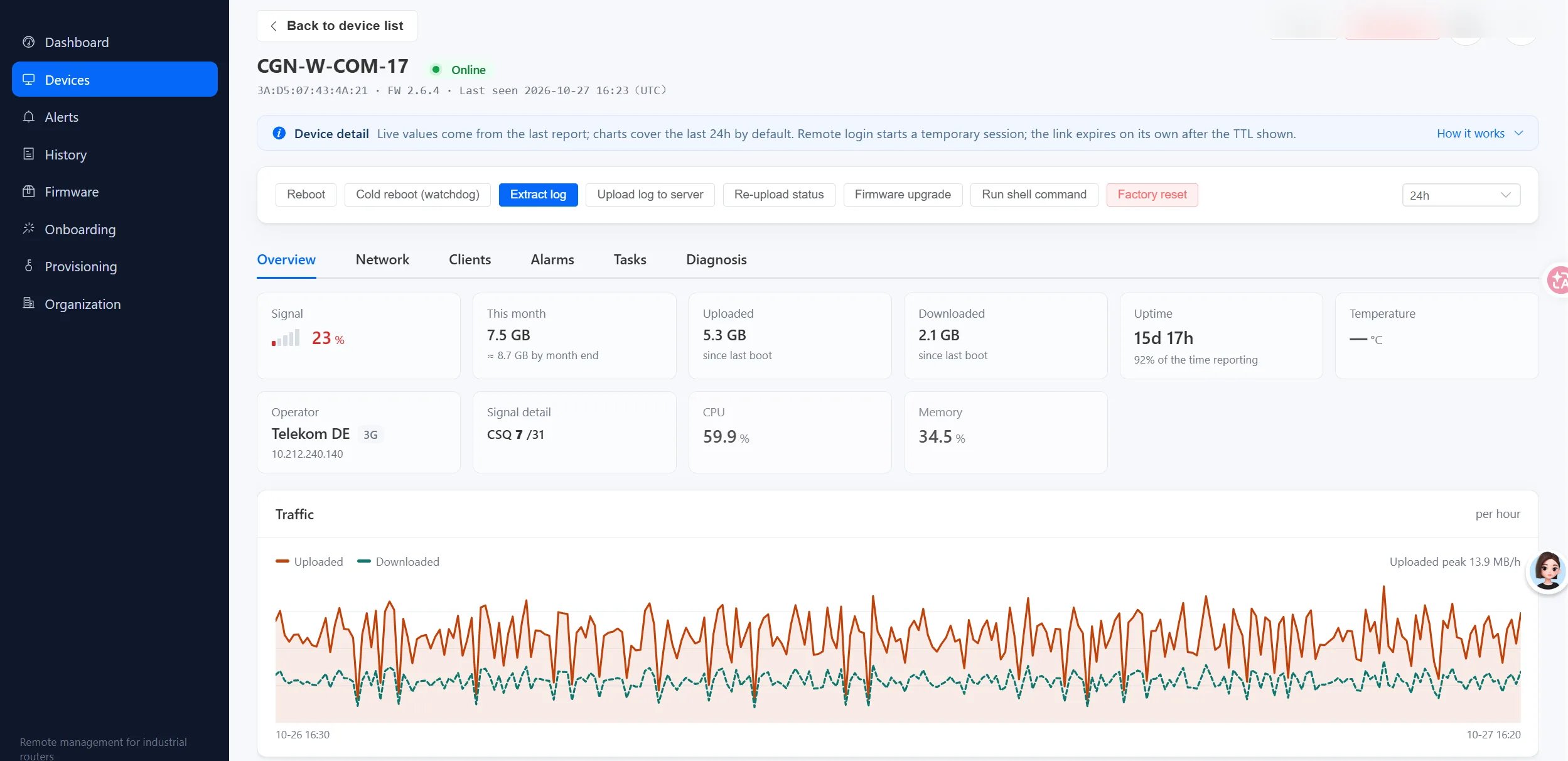
Signal, temperature and uptime — the numbers that decide a site visit
The device page is where a technician would otherwise spend the trip. Signal, load, temperature and uptime are all on the first screen, with 24-hour charts underneath.
What a technician sees
Before you put anyone in a van
A weak signal is a bad antenna or a bad position, not a broken router. A hot module is a cabinet with no airflow. Both are visible here, so the person you send already knows what to take.
Your SIM, your carrier — we only show you the health
Our routers take a SIM card you supply and connect on your terms. The platform reads what matters for a project — live signal, data used this month, and how often the link drops — per device, in plain English. We do not sell you a data plan; we help you keep the one you already have online.
See the bars before the call
Signal strength and radio detail (RSRP / RSRQ / SINR) for each unit, so you know whether a weak link is a bad antenna or a bad position.
Catch the thirsty unit
Per-device traffic for the month and a ranking of top consumers, so a site on a fixed data plan does not surprise you on the carrier invoice.
Know the flaky one
How often each link goes down and for how long, so you can move the antenna or change the mount before it becomes a truck roll.
The SIM and the carrier are yours — the platform only surfaces their health. That is what lets a distributed fleet run without anyone watching a screen.
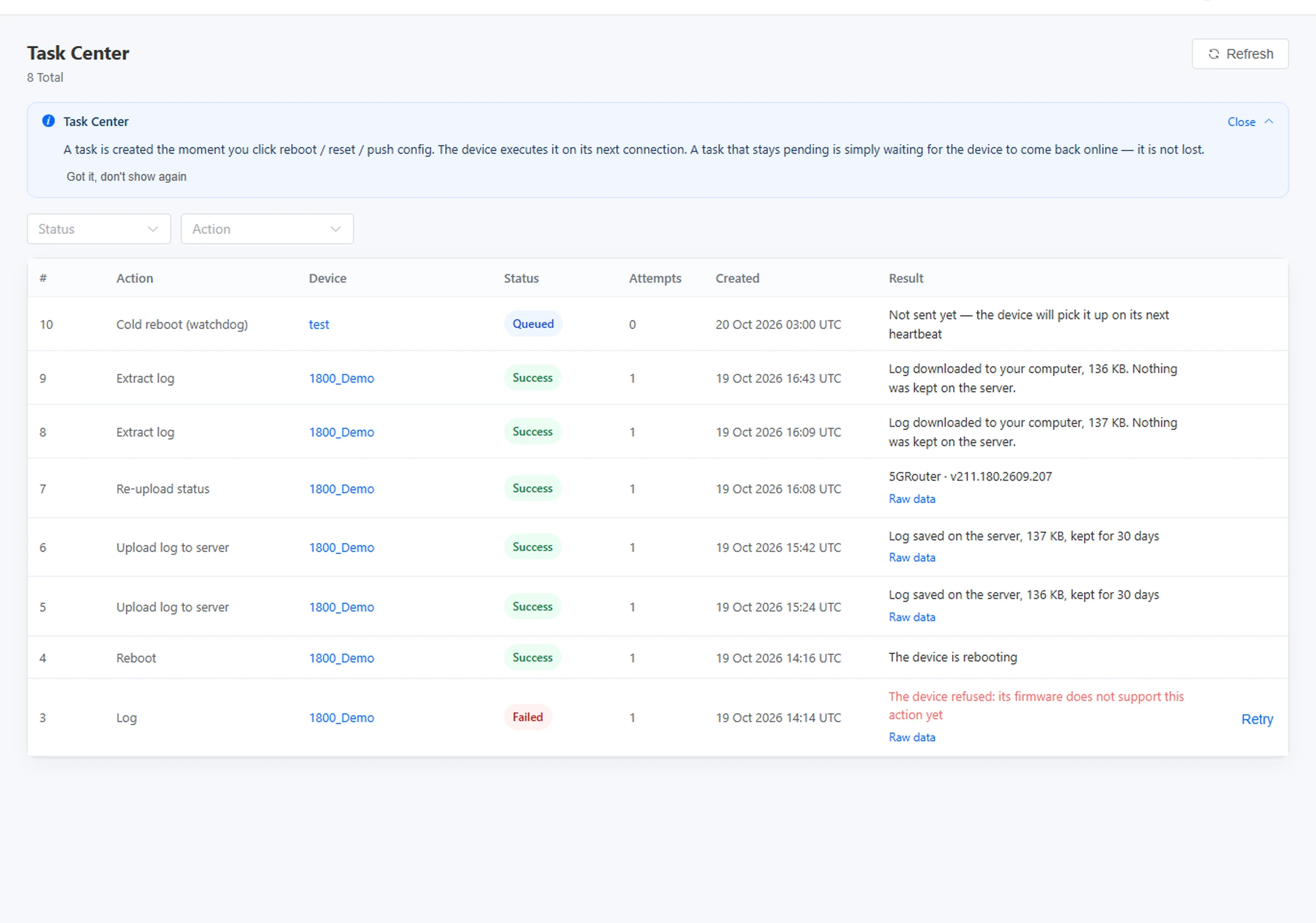
Every command gets an answer, including “the device refused”
Remote actions are the part that quietly fails on other platforms: you press reboot, the page says “done”, and nothing happens. Here each task carries its own status and the device’s reply.
What a task record contains
Queued, succeeded, or refused — never “sent”
A task is created the moment you press the button and executes on the device’s next connection. If a unit has been offline for a week, the job is waiting, not lost.
An alert lands where your team already works
Monitoring only saves a truck roll if the right person sees it in time. The platform pushes alerts to the channels your team already has open — not just a dashboard they have to remember to check.
Alerts render in the tools you use
Teams alerts use the native MessageCard, so they render directly inside Teams and Outlook — no Power Automate flow to build. One alert can hit both your on-call channel and a mailbox.
Five channels, one rule
Beyond Slack and Teams, alerts reach Telegram, plain email and a generic Webhook for your own automation. Route by severity so only real incidents wake someone up.
No mixed-language surprises
Alert and monthly-report emails are pure English — subject and body — timestamped in UTC. Monthly reports now bucket by UTC day, so figures do not slip a day at month boundaries.
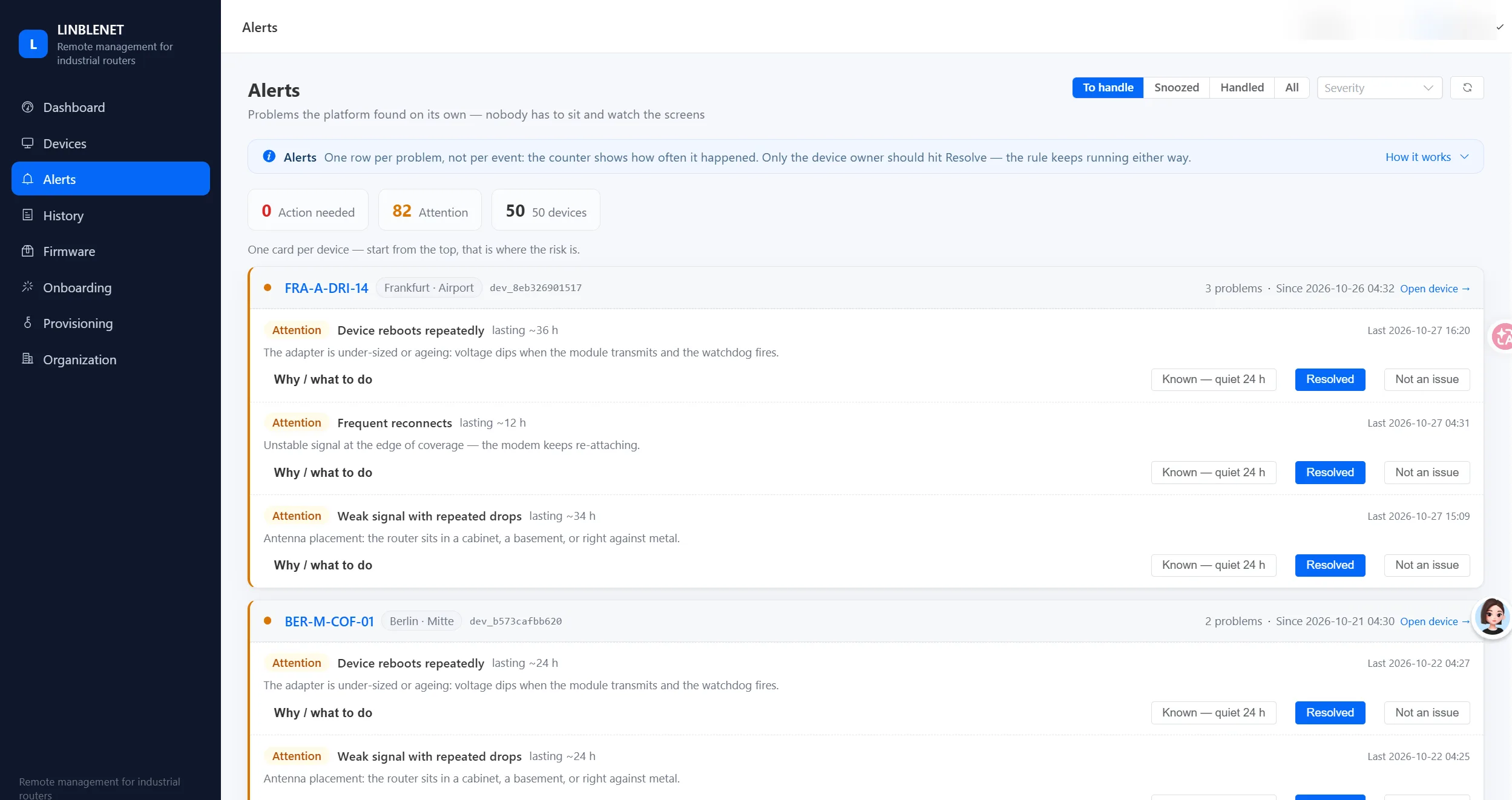
What the alert list looks like
One card per device, the cause in plain English
Problems are grouped per device, not per event, so you see “this unit rebooted repeatedly for 36 hours” rather than a hundred separate pings. The cause is written in words a technician understands, and only the device owner can mark it resolved.
Monthly reports summarise per-device traffic and status for the period, and the attachment header follows the site language. Reports are generated server-side and delivered to the addresses your account names.
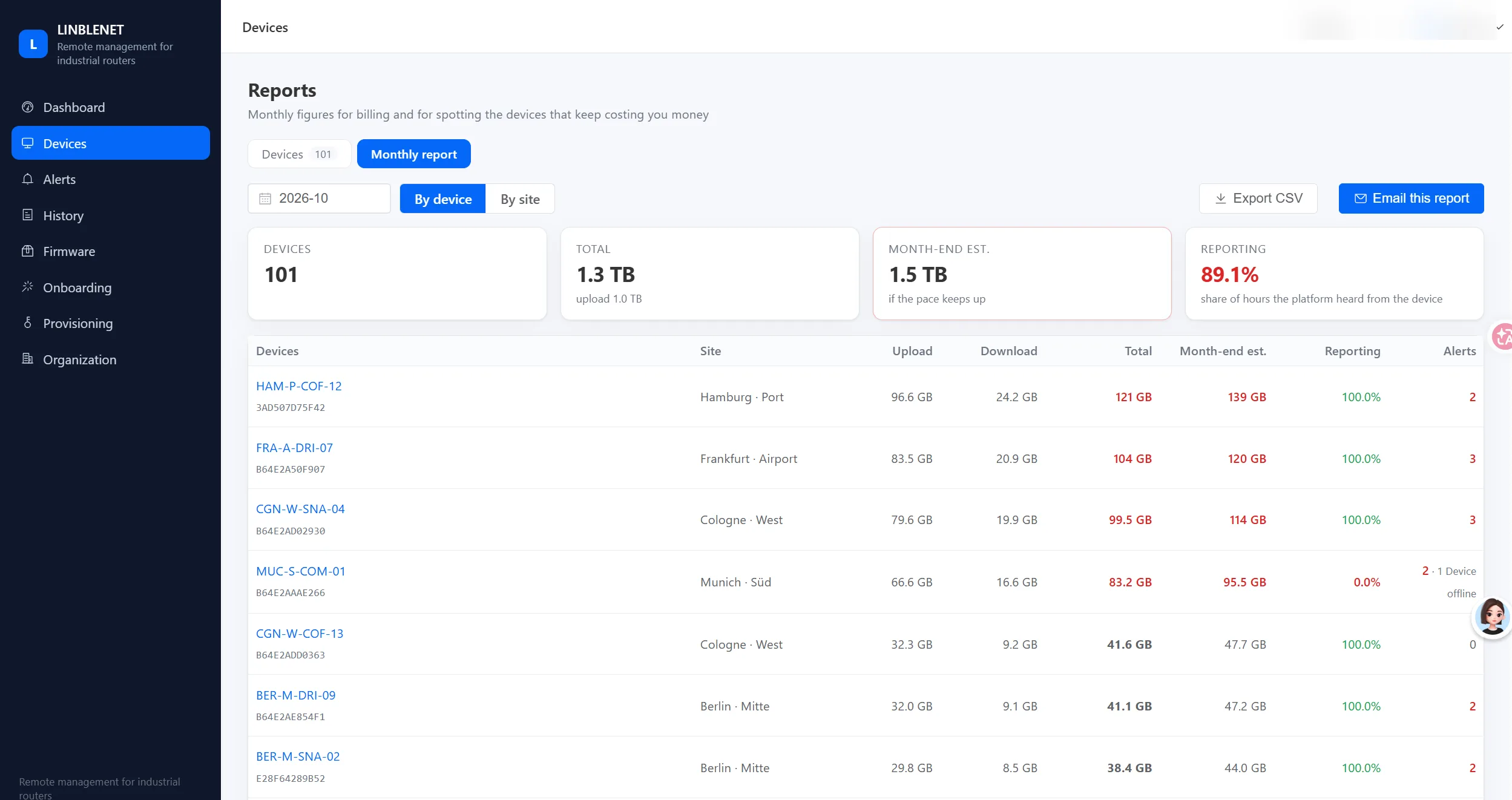
What the monthly report shows
Billing figures and the units that keep costing you
A monthly summary you can export to CSV or email to a customer. It totals upload and download, estimates the month-end total from the current pace, and ranks devices by data — so a unit quietly pulling a camera’s main-stream preview shows up before the carrier bills you.
What works depends on how the device reports
Our units reach the platform over one of two lines: a lightweight MQTT connection on newer firmware, or the standard HTTP reporting that every unit has had since the beginning. Monitoring works on both. Remote actions need the MQTT line. We would rather show the gap than let you find it after signing.
| Capability | MQTT line | Standard (HTTP) line |
|---|---|---|
| Live status, signal, traffic, CPU, memory, uptime | Yes | Yes |
| Per-device and per-site permission scoping | Yes | Yes |
| Queue a task while the unit is offline | Yes | — |
| Remote reboot, reset, log extraction, firmware upgrade | Yes | — |
| Device’s own answer shown on the task | Yes | — |
| Change LAN IP, Wi-Fi SSID or password from the dashboard | Not offered | Not offered |
| Run arbitrary shell commands and read the output | Command only, no return output | — |
Four steps, and none of them touch your network
The platform does not require a public IP, a VPN concentrator or an inbound port. Units dial out to it, which is why it also works behind carrier-grade NAT on a mobile network.
Devices provisioned
Units are registered to your account at the factory, or added by us from the serial numbers you already have in stock.
Units dial out
Each one connects outbound and waits for approval. No inbound rule, no port forwarding, no public address on your side.
You approve
Approve the hardware in the device list. Until then it cannot join the account, which keeps stock units and re-sold units out of your fleet view.
Users and sites
We set up your operators and their site scope. A regional engineer sees their own sites and nothing else.
One platform, scoped from channel down to device
A distributor, their customers and each customer’s projects should never see the same thing. Permissions converge at every level, so an operator only ever sees what their role allows.
Channel
The top level. A distributor or regional partner sees every customer and site beneath them.
Customer
Each end customer sees only their own devices and reports — nothing from other customers on the platform.
Project
Within a customer, devices group into projects, so a site team works its own estate.
Device
At the bottom, every unit is approved before it can connect, and every view is filtered to the signed-in scope.
Right access for each job
Administrator, channel, customer, operator and viewer, plus finance, warehouse and sales roles — so billing, logistics and sales see only what they need.
Short-lived tokens, hardened storage
Passwords are stored with bcrypt; sessions use short-lived JWT access tokens with server-side refresh tokens. When an admin resets a password, every other active session is invalidated immediately.
Built for the field, not just the desk
The console is responsive for tablet and phone — including a fix for the iPad bottom-navigation overlap — plus a lightweight mobile view for quick on-site checks.
It ships with our hardware, not on top of it
Most fleet platforms are a separate subscription that you glue onto a router from a third party. This one is written against our own firmware, and it is supported by the people who built the hardware.
One supplier for both halves
If a remote action fails, it is not “ask the platform vendor to ask the router vendor”. The firmware and the dashboard are ours, so the fault is ours to find.
Honest status, not optimistic UI
A task shows what the device answered. If the firmware does not support the action yet, the task says so in words rather than reporting success.
Scoped by default
Devices are approved before they connect, and every number on the dashboard is filtered to what the signed-in account may see.
Where it fits, and where it does not
It is a fleet monitoring and maintenance tool. It is not a full router configuration manager, and we would rather say so now than during your first month.
✓Good fit
- Distributors and integrators maintaining routers on customer sites
- Solar, charging, vending and signage estates where units are hard to reach
- Any fleet where “is it online and did it use its data” is the daily question
- Teams that need their operators split by region or by customer
–Not the right tool
- Changing LAN or Wi-Fi settings remotely — the unit’s own web page is the place for that
- Deep per-rule firewall or routing policy management across a fleet
- Any need for line-by-line shell output as a supported feature
- Certification or compliance evidence — the platform makes no claims of that kind
Get Cloud pricing
Tell us about your fleet and we will send a quote with the exact plan and volume pricing. Fields marked * are required.
Want to see it against your own fleet?
Tell us the models you have in the field and roughly how many sites. We will open a walkthrough dashboard with representative data, or add your units to a trial account if you prefer to see live numbers.
We answer from Shenzhen, Monday to Friday 09:00–18:00 (UTC+8). If you already own our routers and just need access, mention the serial numbers and we will attach them to your account.